Why an export is hard to read
A Brightspace export holds a great deal of useful evidence, but it is spread across a manifest, linked XML records, HTML pages, activities, rubrics, files, and identifiers that only the platform uses. Someone reading one file at a time cannot get a dependable view of the whole course.
The harder problem is trust. If a tool hides what it could not read, guesses at missing material, or produces a polished document with no connection back to its source, the result is easy to admire and hard to review.
Blueprint Wizard is built the other way around: it reconstructs what the export supports, keeps what remains uncertain, and gives a person both the readable document and the evidence needed to question it.
From export to review
The reading itself is done by the blueprint bundle, the engine the Wizard wraps, pinned to an exact release. While it runs, the Wizard shows which of the bundle’s steps is active, what has finished, what needs a person’s eye, and which file is the sensible place to start. After setup, the core workflow runs offline; checks that need the network are separate and optional.
What comes back
coursecraft.run/2.Depending on the source, the bundle can also return files for the course’s Brightspace rubrics: a Word document for reviewers, an Excel workbook for editing, and structured JSON. When rubric evidence is missing, the Wizard does not claim that no rubric exists; it records a finding that holds for this export and this run only.
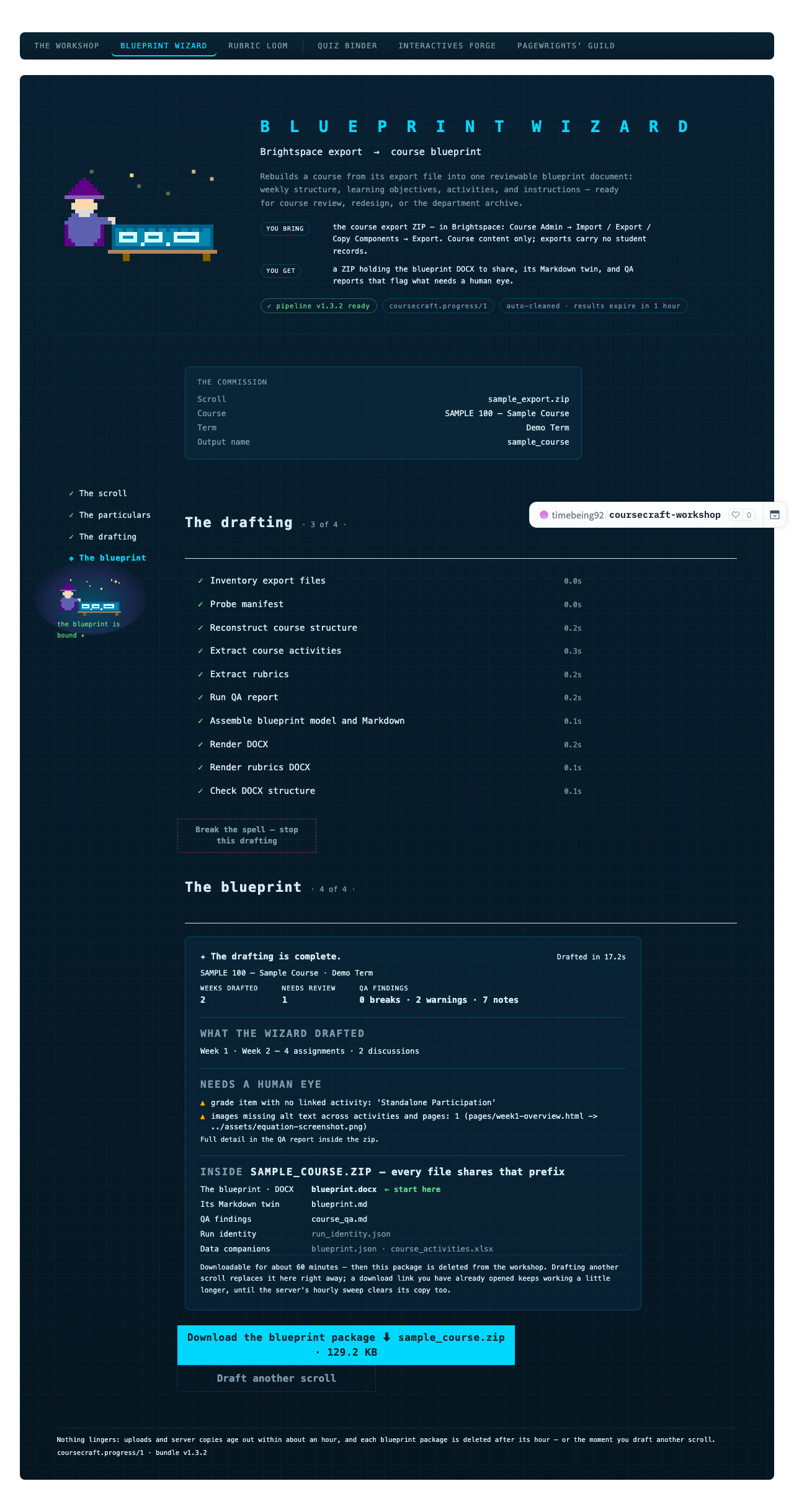
What a finished run looks like
Local and hosted
| Local Blueprint Wizard | Hosted CourseCraft Workshop |
|---|---|
| Best for private institutional exports and routine work | Best for zero-install exploration with synthetic or approved material |
| Source files stay on the user’s computer | Uploads enter a time-limited hosted runtime |
| Managed releases verify a complete Runner/Bundle pair and support rollback | The Workshop finds and verifies an exact bundle release |
| Full terminal workflow on macOS, Windows, and Linux | The same bundle’s results and files, in a browser |
| Primary path for real course work | Secondary demonstration and colleague-review path |
The CourseCraft Workshop, the hosted demonstration, deletes a run’s working files when the run ends, keeps uploaded and downloadable copies for about an hour at most, and removes them sooner if the visitor resets or runs again. For sensitive course material, the local application is the intended path.
The bundle and its two interfaces
Keeping the reading in the bundle stops either interface from quietly becoming a second, different reading of the export: the terminal and the web page show what the bundle reports, and neither guesses by scanning whichever files happen to appear.
What stays with a person
What the Wizard does not do
It does not import into Brightspace, change the source course, turn QA findings into automatic corrections, treat missing evidence as proof of absence, or replace human review.
A run can finish cleanly; it can keep the usable part of its results and name the components it could not read; or, when the bundle reports that the documents do not faithfully mirror the export, it can stop presenting them as a blueprint. A course with no weekly structure is labeled as empty, so no one mistakes it for a failed reading.
This is the design decision I care about most: unknown is allowed to remain a result. The tool makes the mechanical work repeatable and keeps interpretation, correction, redesign, and publication with a person.
Download, inspect, or try it
- Download Blueprint Wizard 2.9.0: the managed release, which is the normal way to install it.
- Inspect the Blueprint Wizard source: launchers, the guided experience, release pairing, update verification, and rollback.
- Inspect the blueprint bundle source: extraction, schemas, QA, output files, progress events, and receipts.
- Try the CourseCraft Workshop: a hosted demonstration that may take a moment to wake after a period of inactivity.
Blueprint Wizard is the released tool that turns an export into evidence. The other CourseCraft tools show where a method is studied before release, how its results are presented, and how its evidence is kept, each in its own repository.
The CourseCraft tools → Next case: Rubric Loom →Sources, and what is left out
Release versions were checked on 2026-11-20. The screenshots use the bundle’s built-in synthetic sample, and no course, learner, or credential data from any institution appears on this page.